Plan the whole system
Start with routines, priorities, failure modes and a sensible order of work.
Learn more
Independent home automation guidance · Australia
Clear guidance to help you understand what to automate, which products can work together and how to keep control local, private and maintainable.
Advice before devices
Good automation begins with the outcome: comfortable rooms, useful lighting, understandable energy and controls that still work when something is offline.
I help you map those outcomes, compare options and turn ideas into a practical Home Assistant plan. Guidance is remote, free for now, and comes with written notes you keep.
Why Home Assistant
Home Assistant is a free, open-source platform that brings devices from many brands into one place. Your dashboards, automations and history live on your own hardware, and the official phone app gives you control and notifications without a separate app per brand.
What the Companion App can doHome Assistant is a trademark of its owner. This is an independent site, not affiliated with the Open Home Foundation.
Guidance available now
Start with routines, priorities, failure modes and a sensible order of work.
Learn moreUnderstand integrations, local behaviour, network needs and limitations before buying.
Learn moreDefine triggers, conditions, actions, safeguards and manual fallbacks in plain language.
Learn moreIdentify conflicting automations, privacy gaps and the improvements worth making first.
Learn moreSee the idea
These lightweight, locally hosted animations show how several signals can become one understandable decision. They are concepts for guidance—not claims about completed customer projects.
Lighting
Occupied rooms warm and dim in stages while switches remain available.
Arrival
Proximity begins the check; trusted identity and position must agree before opening.
Climate
An open window can pause cooling and explain why it happened.
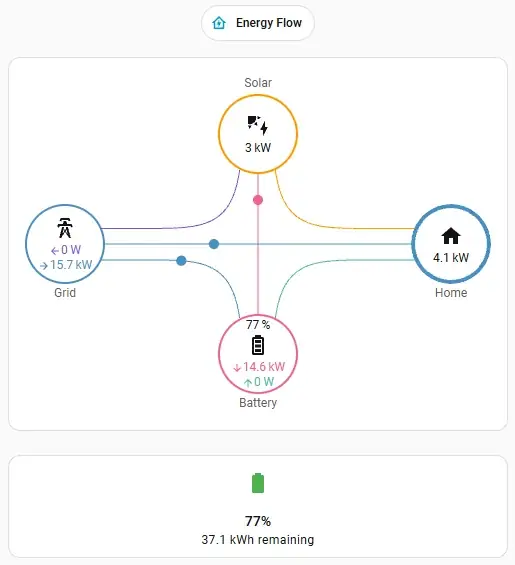
Energy
A flexible load starts only when measurements and device limits agree.
Water
A leak event becomes a clear notification without replacing physical shut-offs or safety practice.
Watch the logic
Each video breaks a possible automation into trigger, checks and outcome. The examples are demonstrations—not live footage from a customer home.
Lighting
Sun position and occupancy work together so occupied rooms settle into warmer, useful light—while wall switches still behave normally.
Open video directlyClimate
Room temperature, occupancy and window state can guide heating or cooling, preventing the system from working against an open window.
Open video directlyEnergy
Once export and device limits agree, flexible loads can run at a better time—without pretending every appliance should be automated.
Open video directlyArrival
Vehicle proximity starts the check; a second trusted signal confirms identity and position before opening. The door’s remotes, obstruction sensing and safety controls remain authoritative.
Open video directlyEvery example is designed as a transparent Home Assistant rule with clear conditions, a manual fallback and a traceable event history.
A considered process
Every conversation starts with what should happen, what must still work offline and what you need to understand before making a decision.
Map routines, frustrations, priorities and boundaries.
Review the home, existing equipment and realistic integration options.
Receive a clear plan with options, safeguards and sensible phases.
Understand the reasons, trade-offs and next steps before proceeding.
Demo Lab
An illustrative public dashboard that shows comfort, energy and automation status without exposing anything private.
Open the Demo LabPractical thinking
Feed-in tariffs, time-of-use and free midday windows.
→ Australia · 6 minWhat is DIY, what is licensed work, and how to brief it.
→ Planning · 6 minDefine the outcomes and failure modes before choosing devices.
→Begin with a question
Share the outcome you want, even if you do not know which technology belongs behind it.
Ask for Home Assistant guidance